
Few years ago, I played with Car PC with some of my friends. At that time, it was complicated to bring PC into the car. We need to buy expensive DC-to-DC inverter, have to buy expensive VIA EPIA C3 mainboard and chassis, then finally have to work with slow VIA C3 processor.
It was so slow and expensive!

We also need to build (or buy) chassis like picture below (taken somewhere on the net).

The cost would be very high just to adopt a slow computer inside your car.
Some of my friends suggested to buy 2nd hand notebook and use it as computer. Interesting. But now, I have a “light bulb” (better idea) on my head 😉
Look picture below.

It’s an Eee PC. Do you get my point? If don’t, let me enlighten you…
Eee PC is a new ultra portable and affordable laptop from ASUS. Weight only 920 grams (225x35x165 mm) with 7″ LCD (the size of double DIN in your car).
Still don’t get my point? 😉 Ok, shall I continue?
On 701 model (4G series, priced around US$ 360-370), it’s equipped with Intel Mobile Processor (Celeron M-ULV 900 MHz and Intel 910 graphics), 4 GB of Solid State Disk (this is what I call a “shock proof design”), and standard 512 MB RAM (easily changed to 2 GB of RAM, single slot only). On my experiment, a complete Windows XP Pro SP2 only takes 25 seconds to boot up.
Don’t forget to mention the standard 3 USB port, Intel HD-Audio (with mic and line out), VGA D-Sub video output, Ethernet, a Wi-Fi 802.11b/g connectivity, and a VGA camera.
Still don’t get my point? 😉 Ok, I quit! 🙂
I’m thinking of disassembly the Eee PC. Separate the mainboard unit with the LCD, then add a touch screen module on the LCD. Then we will have the finest and most affordable Car PC on the market.
Check the photo below.
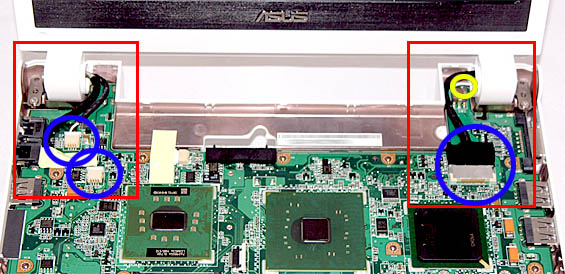
We have to separate (and make some extension for some cables). From the picture above I think we will have some cables like camera, speaker, inverter, LCD video, and wireless antenna cable (usually two, with black and white color).
I don’t know whether we can create a cable extension (especially for LCD video cable). But I think we have that possibility.
For storage, we could add USB Flash Disk or SD Card. I think, 8-16 GB card will suitable for this stuff. We can have small Bluetooth USB dongle, some USB GPS module, or similar add on. It’s very easy to add since this is a real PC.
Power supply consideration
I recommend to use the battery. Why? Because we can shut down the Eee PC in Windows, but it will take 15-20 seconds to complete shutdown of the system. You don’t want to wait, right? So turn off your car then this Eee PC will automatically switch to battery mode until it completely shut down. If you don’t use battery, you need to wait until it completely shut down before you can turn off your car engine.
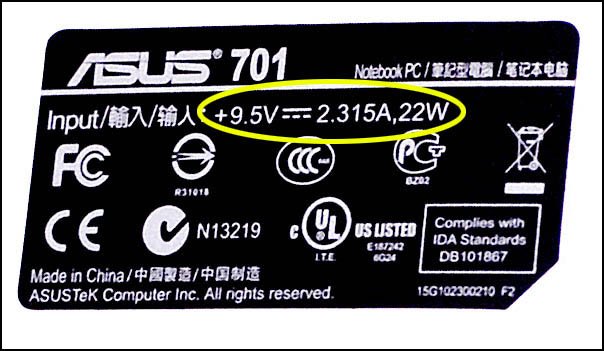
The standard power supply for Eee PC is rated at 9.5 Volt and 2.315 Ampere. In you car, the voltage (engine is running) is around 14 Volt. You will need a regulator to make sure your Eee PC will receive a good supply.
The easiest method is to use LM138 regulator (support up to 5A).
Picture below shows the possibility to use LM138/338 as adjustable regulator. The minimal input voltage should be 2 or 3 Volt higher than output voltage. In the case below, the V input is 28 Volt. So maximum V output (after adjusted/regulated) is 25 Volt (it can be adjusted by potentiometer – named R2 on picture). For our purpose, which needs V output at 9.5 Volt, so minimum V input should be around 12.5 Volt. That should be fine since we can have around 14 Volt in car when engine is running. Adjust the potentiometer (R2) to get the necessary Voltage output.

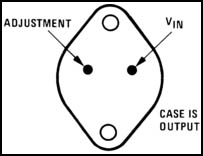
Make sure you use sufficient heatsink on the LM138/338. I use LM138/338 because it supports 5A (although Eee PC will draw around 2.3A only). It’s kind a bit overrated, but it can make your life easier (and you can sleep well) rather than using a cheap but too close small rated regulator.
This is just a concept idea from me. Feel free to use it and let me know if you really can do it…


kevin
March 5, 2008 04:53I guess that point of an car computer would be to allow for a full multimedia experience along with enhanced radio (mp3/recording/videos). While the EEE pc is a good start would we not just use a mini-pc form factor with integrated Bluetooth for control, wifi and WiMax. I think the battery is a good ideal regardless for camping & other outdoor activities (could use solar to recharge). Well these are just my thoughts. A mini-pc with a TV tuner & radio card along with Touchscreen would be the ultimate mobile system you could actually see and maybe print your shopping list and looking for sales along with movie times while sitting in the parking lot.
alex
March 17, 2008 23:44Hi Jimmy
did you proceded with this idea ? asking because i’ve the exactly the same and should be nice to know if there is some showstopper before spending money :-)) The main I’ve seen is the LCD video cable where seems that several guys failed.
Kevin, the main reason to do it with an Asus EEE is the price, it costs the same price of a 7″ touchscreen 😉
alex
Jimmy Auw
March 18, 2008 17:52Hi,
I haven’t tried to disassembly the LCD cable and check it (because I believe you have to check the structure of this cable first). I wont be that easy, but I think someone has to try it.
I just throw the idea only… 🙂
Brian
April 8, 2008 00:16This is a spanking idea Jimmy, but how about leaving the Eee PC complete, adding a touchscreen monitor, then mounting the Eee PC in a docking station so that you can remove it from the car any time (say for meetings etc.)
The docking station would have to hold all the USB and audio connectors in the same place so you can just slot it in. (I’d need to have a look at one to see where all the ports are to make sure though)
Excelent idea Jimmy 😀
Horacio
May 8, 2008 02:05Brian,
I really really like your idea. The eee PC could go in the glove compartment, plugged to the docking station. The installation would be pretty clean as well.
Anybody has done it before?
Michael
May 18, 2008 13:44im thinking of doing somthing along the lines that Brian was sugesting and having a docking station type thing but without the touchscreen.
the only problem is the ports on the eepc are all over the place: power at back. bga and 2 usb on right and audio usb audio and network/modem on left.
you have to have it so it slots into the power and then have some side plates that sorta slot in.
and thanx jimmy i compleatly forgot about the veriable regulators. was trying to figure out how was going to get 9.5v out of standard regulatoers…
Ciko
June 9, 2008 15:59Hi Jimmy!
Did you already try out your plans to integrate the EEE into your car?
I am planning to do something similar but I’d like to leave the EEE intact as it is so i can undock it and take it with me when i need a small mobile device. Therefore i have already organized a nice vga display and a car adapter that fits the EEE’s power socket. I still have one problem left. How can I start the EEE as soon as the car is powered on?
Do you have any idea on that?
Best regards
Ciko
Jimmy Auw
June 9, 2008 23:03Hi,
I think it’s impossible, unless you do some modification inside.
Thank you.
Per Trapnes
July 4, 2008 05:57I’m working on the same idea. I will also go for the “keep it almost complete”
Auto On / Off with a small modification of the switch (I bring the switch up on dashboard)
my car have already a 7″ LCD in the nav. system that I’m going to use (VGA to video)
Going to control the eee with a “joystick” that’s installed just in front of the armrest.
Auto Gps
July 21, 2008 23:45I found your blog via Google while searching for auto gps and your post regarding Eee PC as Car PC. Anybody? looks very interesting to me. Just wanted to drop you a quick note to say thank you for a great resource.There is nothing else like your site on the net today. My friends are just going to love this site once I let them know about it.
nick
September 14, 2008 08:55this is a great idea! I’m thinking about doing this myself. I’ll use linux. Perhaps once the battery gets down to say 20% it goes to hibernate, a little bit faster to pick up. I wonder how long the battery will last doing that, it’s quite a bit of wear and tear.
Jeff Anderson
October 22, 2008 15:11I had this same idea hit me when a coworker of mine got his Eee PC. I see this as a viable option because it is cheap. My wife found a touchscreen kit intended for the Eee PC– only $90 shipped. I just have to mount the screen in my dash, and find a long enough ribbon cable so I can detach the Eee PC’s monitor from the unit itself.
The potential problems I can see are:
1) LCD is insufficient for in-car daytime hours use.
2) Finding the longer LCD cable may not be terribly practical or easy. (as mentioned in the post)
3) Making modifications to get it to start up/shut down at the appropriate times.
Daskwerks, Inc. Offers a $49 product that is designed to help integrate a computer into a car by solving the startup/shutdown problem. It can handle turning on all the various components that might be involved in a car pc (lcd screen, inverter for the machine itself, etc.) It’s called the startup and shutdown controller: http://www.dashwerks.com/dw_dssc.php
Its overkill since we’re condensing a lot of this stuff (screen, power, cpu) into one box, but it’ll handle startup and shutdown ok.
It expects that the motherboard it is talking to has either a WOL or ACPI header for startup. It can use the ACPI header for shutdown/hibernate as well. It also has a straight up serial port that can be used to send the text “shutdown” when it is time to shutdown or go to sleep (when the key is pulled out of the ignition.) I’m only concerned about the startup circuit– does the Eee PC motherboard have something I can plug into, or am I going to be soldering the crap out of my motherboard? I guess I could hack together a “usb HID” device that receives the startup signal, and generates an event that tells the Eee PC to start up or wake up. This should be configurable in the bios, especially if I’m only hibernating the Eee PC. It’d look like a simple mouse move or keypress to the Eee PC.
You can find Eee PC “car power adapters” out there on the market for relatively cheap, so I’m not worried about that. No need to have to put together your own variable regulator stuff for power. 🙂
The only other thing I can think of is where I’d mount the built-in webcam. Maybe if the extension cable was cheap and long enough it’d make a decent reverse camera? Probably easier to mount your own usb webcam rather than try to fish that little thing in somehow.
Steve Foxton
October 26, 2008 09:49Just found this site via google as im wating to do an similar idea.
@ Jeff: just so you know, if you intend to extend the usb cable for the camera so that it works as an reverse camera you will have to bear in mind that usb has an maximum length of 5 metres unless you use an booster of sorts in the middle (found this out while experimenting with passing usb to another room)
Shutdown can be acomplished via the Power management console in Control Panel. Set it to goto standby after 1 minute of battery power (i might be able to write an program that does this in shorter time but havent looked at code yet as its 3am)
I think Jeff’s idea with dssc is the safest option in order to get it to boot on car. There are other controllers that can do similar aswell and can be included in the build which can be found here.
http://linitx.com/viewcategory.php?catid=54
Also worth considering is installing Xp using nlite to customise the install disc, as this will remove un-needed services from the install and make it an quicker bootup.
Creating the extension cable for the screen shouldnt be hard as long as you are an dab hand with an soldering iron, have some cable shrink, and use decent wire.(easier if you splice the wires than pop the connector).
You can also desolder the usb connectors and the vga connector if need be to somewhere more appropriate.
One more part id like to note is something i’ve been trying to figure out for my project. If its going to be fitted into an double DIN slot in an car, where would you put the cd/dvd drive as the screen will take up most of the DIN slot?
My solution i think is going to be to attach the drive to the back of the screen mounting and have the screen tilt forward via an electronic servo when the eject command is sent.
I might buy my Eee PC after xmas and give it an go.
frank
December 15, 2008 21:00I had the same idea , but i was wandering about the extension cable for the lcd.
If we will make it longer wont that affect the image on the lcd? i just got one eee pc 4g and there are 20 cables going in the lcd, my question is.. what type of cable can i use to try this extension?
Kevin Puvent
December 19, 2008 17:23Ciko Says:
June 9th, 2008 at 3:59 pm
Hi Jimmy!
Did you already try out your plans to integrate the EEE into your car?
I am planning to do something similar but I’d like to leave the EEE intact as it is so i can undock it and take it with me when i need a small mobile device. Therefore i have already organized a nice vga display and a car adapter that fits the EEE’s power socket. I still have one problem left. How can I start the EEE as soon as the car is powered on?
Do you have any idea on that?
Best regards
Ciko
___________________________________________________________________________________
What you can do in Windows XP and Windows Vista is to let the system hibernate when the power is off. So when you turn the car off, and suppose that your power also turns off, the EEE will hibernate. When you turn the car on, it will start up again. Go into the power settings and have a play around.
Rajeev Velikkal
April 20, 2009 23:40I did this successfully. Initially I cut the LCD cable and soldered a 25 core wire. But unfortunately while soldering I burned the insulation of all the wires and the connectors became useless. I manged to pull all the cables out from the connectors and place some thinSo one should be very
Rajeev Velikkal
April 20, 2009 23:49I did this successfully. Initially I cut the middle of the LCD cable and soldered a 25 core wire. But unfortunately while soldering I burned the insulation of all the wires and the connectors became useless. I manged to pull all the cables out from the connectors and placed some thin insulated copper wire instead. So one should be very carefull while soldering the wires. I would suggest dipping the connector ends in water as the insulation on these wires are very thin(just a plastic film that can easily melt even with a slit touch of the soldering iron).
I tried with 2 meters of wire but due to signal lose I had to cut short to 1.5 meters. It works fine. I build a power supply by just referring the site http://www.youritronics.com/asus-eee-pc-car-charger-2/
Nick
April 24, 2009 16:20Actually I’m brainstorming about putting my eee 900 into the car.
I’m connecting a 7″ VGA lilliput touchscreen wich is integrated in my dash.
For the power supply I want to use a cheap ebay car charger. I’d like to leave the battery in the eee pc because when I start the engine the pc can survive on battery power.
I’d like to add a on/off switch to the + wire of the car charger so I can secure the pc from power peak when starting.
my first idea for powering the pc on was to solder two wires on the motherboard internal on/off switch and connect them to a external switch.
But when I read above text about Hibernating when power get’s off, I think that’s a better idea than soldering two wires.
My question is: Will the pc go to hibernate when I disconnect the car charger, but leave the battery in the EEE as well?